OBJECTIVE:
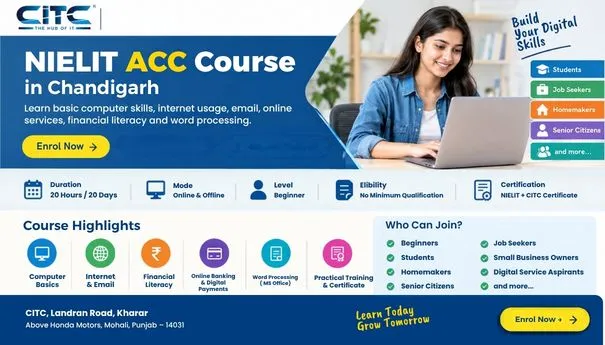
By undergoing the Awareness in Computer Concepts (ACC), one should be able to acquire basic knowledge on
computer & its usage by understanding the following skills:
- How to operate the elements of a computer
- Perform operations on the computer
- Access the Internet and finding information of interest
- Register for a web-based e-mail account and using it, Opening of e-mail attachments
- Understanding Financial Literacy
- Digital Literacy to understand the concept of Online Banking
- Create, edit and format documents using a word processor
The module on financial literacy will enable the individuals to understand the various financial services and be
aware of the various schemes of Government of India.
COURSE DURATION:
20 hours
ELIGIBILITY:
No minimum qualification is required for applying and appearing for the examination in Awareness of Computer Concepts.
Certificate could be awarded to the candidates after completion of the course.
SYLLABUS OUTLINE
| Module 1 - How to operate the elements of a computer: |
Operate the elements of a computer including power chord, power switch, network connecting cable, USB ports, Mouse (click , click and drag, double click, right click (for the context menu)), Keyboard (some of the more common letters, enter, backspace, shift, tab and arrows), interface icons, GUI Elements (use the menu, resize a window, minimize a window, maximize a window, move a window, locate items in Start Menu, using the scrollbar) Editing Options (copy, paste, cut, undo, redo, spell check) |
| Module 2 - Perform operations on the computer: |
Perform operations including switching on the computer, logging in, locating a file, opening a file, printing a document, storing a file with proper extension, creating a folder/ sub folder in a volume on hard disk and desk top, shifting files from one folder to another, shutting off the computer under Windows O.S. |
| Module 3 - Access the Internet and finding information of interest: |
Access the Internet, use a search engine, and find information on a topic of interest |
| Module 4 - Register for a web-based e-mail account and using it, Opening of e-mail attachments: |
Register for a web-based e-mail account, log in and log out of an e-mail account, access email with attachments, Opening an attachment and saving it, reply to an e-mail, forward an e-mail and delete an e-mail message |
| Module 5 - Understanding Financial Literacy: |
Why savings are needed, Why save in a bank, Banking products-ATM card, Banking Instruments-Cheque, Demand Draft (DD), Banking Services Delivery Channels, Know Your Customer (KYC), Opening of bank account and documents required, Types of bank accounts, Bank’s services including remittances, loan, mobile banking, Overdraft, Pension etc., Pradhan Mantri Jan Dhan Yojana (PMJDY), password security and ATM withdrawal, Insurance, Social Security Schemes-Atal Pension Yojana (APY), Pradhan Mantri Suraksha Bima Yojana (PMSBY), Pradhan Mantri Jeevan Jyoti Bima Yojana (PMJJBY), Pradhan Mantri Mudra Yojana (PMMY). |
| Module 6 – Digital Literacy to understand the concept of Online Banking |
Make bill payments, Make money transaction through online banking, book train and bus tickets, pension transactions, seek information on agricultural operations and land records, and interact with employment exchange, municipalities, gram panchayats, police and passport offices |
| Module 7 - Create, edit and format documents using a word processor: |
Word Processing Basics, Creating, Editing and Formatting of text, Saving and Printing of word document |